
Wednesday, June 30, 2010
Wiki Spaces
I find that Wiki Spaces are an easy tool to use and could be very helpful in the classroom. I specifically like that many people can work on the same website and collaboratively work to make it better. Starting this class, I really thought that wiki spaces were hard to create and keep up. I often saw many of my teachers using it (including this class) and thought that it would be something extremely complicated to try to figure out. Along with several of the other things that I found out this semester, it actually wasn't hard at all to create, work, and use. I think that using this in a classroom in several different ways could be beneficial. I saw one of my group mates used it as an update station for parents and students. It served as a home base for assignments, events, and study guides. I know that while I was growing up in school, my parents were often disconnected from what was going on in my classroom other then what I would bring home for them to look at and the occasional conference. I think by having a class wiki it would create an open environment for students, parents, and the teacher. It also can serve as a tool for class projects and a reference tool.


Tuesday, June 29, 2010
Wiki: Digital Cameras in the Classroom
Here is a link to my new Wiki that discusses the benefits of using digital cameras in the classroom.
Wiki Space
Wiki Space
Digital Storytelling
I think that digital storytelling is such a useful tool to be used in the classroom. I think that this could be used as a personal tool in the classroom. When students are asked to create stories or write narratives there is a lot more expression if you can actually hear them read their story and hear their expression instead of just asking someone else to read it. Students can add to their stories by adding in pictures they have drawn or that relate to the story. This allows students to directly visualize what is happening in the story.
This tool is so important and useful if used in an effective manner and although it might be difficult for younger students to "work" and figure out the logistics, that can be easily solved with a teacher's help.
Since this site can make the threads private it allows only certain people to view the digital story keeping student's work to the private.

This tool is so important and useful if used in an effective manner and although it might be difficult for younger students to "work" and figure out the logistics, that can be easily solved with a teacher's help.
Since this site can make the threads private it allows only certain people to view the digital story keeping student's work to the private.


Monday, June 28, 2010
Jing
Although Jing was hard for me to understand how to use at first, simply because it was...too simple? There was only three buttons on the top corner of my screen, to perform the multiple steps of recording a video or screenshot, editing it, recording, saving, and sharing. Surprisingly once I watched to tutorial on it, it became very easy to use. Since I have watched several videos in this class of people creating and teaching lessons using just their computer screen I was naturally curious to find out how they did that. Well now I know! I think that this tool is so useful and could be used in many ways in a classroom. One obvious choice is when you are teaching an online course. This course has used this technique several times already and I have found it extremely useful when trying to understand things. However, I think in a classroom it could be used as a supplement to normal lessons.

I created a lesson that would be used in an everyday fifth grade classroom and to give students an overview (or possibly other staff members) I created an overview of my lesson which you can see at the gallery.
Here is the link to the homepage where you can see tutorials or download a free version to get started.

I created a lesson that would be used in an everyday fifth grade classroom and to give students an overview (or possibly other staff members) I created an overview of my lesson which you can see at the gallery.
Here is the link to the homepage where you can see tutorials or download a free version to get started.
Monday, June 14, 2010

BBP Non-Audio Presentation
Here is my presentation with no audio on Prime Factorization for 5th graders.
Google Docs
Well it is as easy as it sounds! I don't know why I have shy'd away from it so much for since it has become so popular but actually getting in there and using it has been a lot easier then I thought it was. I find that this could be SUCH a useful tool in the classroom as well as a collaboration technique among teacher and professional colleagues. With students (most likely older ones) I think this could be a great tool for editing. Remembering back to my days in school I remember countless papers that I would have to re-write after I had one person edit my paper. And it wasn't usually just one person that would edit my paper it would usually be up to 5 peers. Now that is usually about (with my own edits) 7-8 papers that I would have to re-write---and I mean write...with a paper and pencil! Granted times have changed and upgraded a bit so those edits can often be done on a computer each times, but I still think that it is a little tedious to go through and change that paper, print it off, bring it to class have a peer edit and then go back and change it. Not only is that a lot of paper wasted but a lot of valuable time. With Google Docs it opens up a whole new opportunity to edit effectively and efficiently. I think that this is something that will be so useful in a classroom. Yes, peer editing is probably the most obvious use of Google Docs in the classroom but there are other uses as sharing work with peers and teachers outside the class. Doing collaborative writing might also be another interesting use out of it. I think that the possibilities are endless but teachers just need to embrace it!

Friday, June 4, 2010
Using Cellphones in Education
This specific topic struck me immediately because I had actually encountered a teacher in my college career that had actually tried to use this technique. In every other classroom you constantly heard teachers say cell phones are a distraction and they don't want to see them in their class. However, this teacher on the first day of class embraced the use of cell phones in the class. This class was a statistics class (Intro-201). Since students who participated must have had texting he allowed it to be optional so students didn't have to get charged. We were asked to save a number into our phone and he asked us a question, "Are you male or female?" We had 1 minute to send a text 1-male and 2-female in the body of the text. After a minute he refreshed the page and there were our results. Every class period he asked us a question like this and before every exam he had a practice exam where we would go question by question to answer multiple choice questions where our results would show up after we answered. I thought that this was so interesting and never though I could or would be capable of figuring out how he did this.
Using cellphones in education is a very controversial subject. It can act as a huge distraction but I think as a society that is moving completely to technology we must use what our students have to our benefit. There are many weaknesses of this much that have to deal with cell phones acting as a huge distraction. An article in Teaching Today called Cellphones in the Classroom lays out a few points of the problems with cellphones in education listed below...
* Sending friends text messages during class time.
* Sending or receiving test answers.
* Bullying or harassment via unwanted text messaging.
* Taking and distributing inappropriate digital photos of students.

These all are very valid and very true from both onlooking and personal experience. I didn't have the opportunity to use a cell phone in this manner in high school but having it throughout college I have often found myself sending several text messages back and forth to friends and family, and sometime even to people that are in the same class as I. Something that wasn't clearly addressed here that I feel is important to state is that it can also be a large cause of cheating. Whether it be the communication of answers or taking a snapshot of an exam and sending it to someone who is taking the same exam in a few hours it makes cheating very easy and tempting.
However, like I stated previously, I think that as teachers we can't be naive in thinking that cell phones only do us harm and can be used for bad things. We must embrace the use of them in the classrooms as it will only become a larger distraction in the future. At this point in time, our knowledge is so limited in how to use them effectively in a classroom because there are still so many people who believe that there is no place for them in the classroom. That same article Cellphones in the Classroom points out several great ways that cell phones can be used in the classroom effectively.
*Calculators. Although most schools have them in math class, other classes that don't have them on hand for students can benefit from number crunching. For example, social studies students studying elections can quickly determine percentages of electoral votes or other scenarios. Science classrooms can use them to perform calculations related to fieldwork.
*Digital cameras. Not all schools or classrooms are outfitted with digital cameras, although many can benefit from them. For example, students can use them to document a variety of things for multimedia presentations or reports. Field trips can be documented and incorporated into digital travelogues.
*Internet access. Many phones have wireless Internet access, thus opening up a world of possibilities for class use. Science students might conduct fieldwork and submit their observations or data to either an internal or external data gathering site. Students can subscribe to podcasts that you produce or offered by a multitude of other sources.
*Dictionaries. Students in literature and language arts classes can benefit from being able to quickly query the definition of a word. Additionally, students who are English learners especially can benefit from translation dictionaries which are becoming available on cell phones.
These are adaptations of how our phones work today, there is no telling what new 'Apps' or features our phones will have 5 or 10 years down the road. By embracing it now I think we are only bettering ourselves and our students now and preparing for the future.

Using cellphones in education is a very controversial subject. It can act as a huge distraction but I think as a society that is moving completely to technology we must use what our students have to our benefit. There are many weaknesses of this much that have to deal with cell phones acting as a huge distraction. An article in Teaching Today called Cellphones in the Classroom lays out a few points of the problems with cellphones in education listed below...
* Sending friends text messages during class time.
* Sending or receiving test answers.
* Bullying or harassment via unwanted text messaging.
* Taking and distributing inappropriate digital photos of students.
These all are very valid and very true from both onlooking and personal experience. I didn't have the opportunity to use a cell phone in this manner in high school but having it throughout college I have often found myself sending several text messages back and forth to friends and family, and sometime even to people that are in the same class as I. Something that wasn't clearly addressed here that I feel is important to state is that it can also be a large cause of cheating. Whether it be the communication of answers or taking a snapshot of an exam and sending it to someone who is taking the same exam in a few hours it makes cheating very easy and tempting.
However, like I stated previously, I think that as teachers we can't be naive in thinking that cell phones only do us harm and can be used for bad things. We must embrace the use of them in the classrooms as it will only become a larger distraction in the future. At this point in time, our knowledge is so limited in how to use them effectively in a classroom because there are still so many people who believe that there is no place for them in the classroom. That same article Cellphones in the Classroom points out several great ways that cell phones can be used in the classroom effectively.
*Calculators. Although most schools have them in math class, other classes that don't have them on hand for students can benefit from number crunching. For example, social studies students studying elections can quickly determine percentages of electoral votes or other scenarios. Science classrooms can use them to perform calculations related to fieldwork.
*Digital cameras. Not all schools or classrooms are outfitted with digital cameras, although many can benefit from them. For example, students can use them to document a variety of things for multimedia presentations or reports. Field trips can be documented and incorporated into digital travelogues.
*Internet access. Many phones have wireless Internet access, thus opening up a world of possibilities for class use. Science students might conduct fieldwork and submit their observations or data to either an internal or external data gathering site. Students can subscribe to podcasts that you produce or offered by a multitude of other sources.
*Dictionaries. Students in literature and language arts classes can benefit from being able to quickly query the definition of a word. Additionally, students who are English learners especially can benefit from translation dictionaries which are becoming available on cell phones.
These are adaptations of how our phones work today, there is no telling what new 'Apps' or features our phones will have 5 or 10 years down the road. By embracing it now I think we are only bettering ourselves and our students now and preparing for the future.
What the 'H' is a tweet?!
In the past couple days my twitter account has been going crazy with new 'tweets' from both friends, family, magazines, and celebrities. Rainn Wilson (Dwight from "The Office" just tweeted "Ever since I was little I've always been good at urinating." Thanks Rainn and Twitter, I definitely couldn't have gone on with my life not knowing that tidbit of information! And I can honestly say that I will never miss another funny moment of Ellen again thanks to her hourly updates. After using it for about three weeks, I personally have felt like I have gained little from it and still find no use or entertainment from it. At least with other social networking sites there is more to look at then constant "What are you doing at this very second" updates. Although at the time I find it useless, I can see that there might be positive upsides to using Twitter. Although I have utilized it there are professionals on twitter that can possibly have more to say then letting the world in on that you just went to Starbucks. I do find it to be a drawback that you are limited in what you say to 140 letters. So really, how insightful can you be in 140 letters? I think that there are other tools that I could make use of my time then see what peers, colleagues, or professionals have to say in 140 letters or less. Using twitter in a classroom, to me, can serve only a few purposes. First and foremost, it will most likely get used as a social tool which will most likely end up getting students in trouble. It is like trying to make facebook or myspace into an academic tool...it probably isn't going to work out. However, since our days as a non-technological society in the classroom are numbered and coming to a quick end then I think that one way we could use twitter as a academic tool is a a connection ground for teachers, students, and parents. If every student, teacher, and parents had one it would be pretty easy to let everyone know about events going on in the class and in the school. But it also could serve as a great tool to let parents know what homework their children have coming up as well as tests/exams. It is a meeting ground for everyone. I think that this could be extremely beneficial but then you quickly are putting yourself in a position to assure you know where that 'line' is and that it doesn't get crossed. If I haven't made it too clear, I don't like twitter and find little to no use for it!

Digital Imaging Lab
I have used Picnik before to edit pictures so it wasn't a problem for me to turn my picture to black and white. Since my picture pretty much took up the entire shot there was no way for me to really crop the picture. Therefore I simply just made the picture smaller. However, for some reason it made the black and white version look a little worse when you would think that a smaller size would make the picture actually look better. I may know how to change the colors, but when it comes to formatting the picture in size and in pixel, its a entire new realm that I am dealing with.
This is a photo I licensed with Creative Commons

Photo Attribution:
Original image: "Sophie"
http://i2.photobucket.com/albums/y12/zoetbfalo25/sophie.jpg
by: Mary Zoet
Released under an Attribution-Non-Commercial-Share Alike License
http://creativecommons.org/licenses/by/2.0/deed.en
Tuesday, June 1, 2010
Incorporating Pictures
I think that pictures are such a strong tool and I have used them several times teaching my mini lessons for classes here already. My lessons were directed towards first graders and the statement "A picture can say a thousand words" is completely true in their case. However, it is important that if we are going to use pictures in our lessons, that we learn to cite them and give credit where credit is needed.
Although it is obvious that pictures in younger grades are extremely beneficial I think that it is necessary to note that it can benefit older grades as well. A lesson that is on the environmental factors of pollution is something that pictures would greatly help with. It is one thing to say that pollution hurts our environment, but it is another to show students the things that THEY do are directly affecting OUR environment. This picture below is a strong example of how their pollution affects our environment. Students should and probably would gain a lot more out of this picture then if I were to just tell them that they should pollute. The citation is followed after the picture.
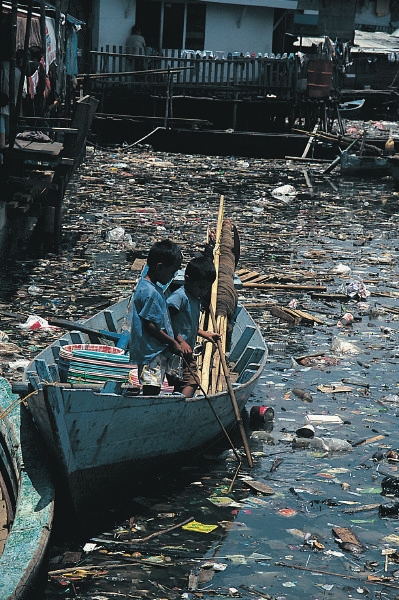
Photo Attribution:
Original image: "Obvious water pollution"
http://upload.wikimedia.org/wikipedia/commons/d/dd/Obvious_water_pollution.jpeg
by: Stephen Codrington
Released under an Attribution-Non-Commercial-Share Alike License
http://creativecommons.org/licenses/by/2.5/deed.en
Although it is obvious that pictures in younger grades are extremely beneficial I think that it is necessary to note that it can benefit older grades as well. A lesson that is on the environmental factors of pollution is something that pictures would greatly help with. It is one thing to say that pollution hurts our environment, but it is another to show students the things that THEY do are directly affecting OUR environment. This picture below is a strong example of how their pollution affects our environment. Students should and probably would gain a lot more out of this picture then if I were to just tell them that they should pollute. The citation is followed after the picture.
Photo Attribution:
Original image: "Obvious water pollution"
http://upload.wikimedia.org/wikipedia/commons/d/dd/Obvious_water_pollution.jpeg
by: Stephen Codrington
Released under an Attribution-Non-Commercial-Share Alike License
http://creativecommons.org/licenses/by/2.5/deed.en
Technology Integration
I have had two experiences with technology integration that vary to the end of both sides of the spectrum. The first experience (and the most drawn out) was in a Lansing public elementary school. I was in a first grade classroom and this class had virtually no technology in their class. The only things that I saw in the classroom that were used very little was a TV (I have never seen it on) with a VCR, computers that are easily dated about ten years so can support very little, and a CD player that was about 15 years old. Much of the reason was because they had so little financial funds that could buy new technologies. It was a sad situation that I felt would have greatly benefited from having some more advanced technologies and I think that it will hinder the students in later life not to have been almost at all integrated with any technology while in school.
My second experience was very short as it was when I was visiting my internship placement in West Michigan. I walked in and this school evidently had a lot more money then the one located in Lansing. I walked into my 5th grade classroom and immediately saw that this class had a smart board. Although I am not very literate in knowing what it does or how to use it I do know that it is a huge advantage to have it in the classroom. Secondly, I saw that the teacher has a computer, there was another one (that will be available for me to use next year), there are 3-4 almost new computers as well as they have two computer labs with almost brand new computers in the school. They also have an ELMO in the class, a overhead, a flat screen TV with VCR and DVD player. And lastly the teacher had a small microphone/recorder around her neck that projected the sound out of speakers that were located over every set of desks (there were about 6-8 speakers in the room). I could not believe the vast different between these two schools. Although I didn't get to see the kids in action using any of the technology but I assume that their experience with technology is going to be better and more advanced then the Lansing kids probably ever will be. oose to write on another experience.
My second experience was very short as it was when I was visiting my internship placement in West Michigan. I walked in and this school evidently had a lot more money then the one located in Lansing. I walked into my 5th grade classroom and immediately saw that this class had a smart board. Although I am not very literate in knowing what it does or how to use it I do know that it is a huge advantage to have it in the classroom. Secondly, I saw that the teacher has a computer, there was another one (that will be available for me to use next year), there are 3-4 almost new computers as well as they have two computer labs with almost brand new computers in the school. They also have an ELMO in the class, a overhead, a flat screen TV with VCR and DVD player. And lastly the teacher had a small microphone/recorder around her neck that projected the sound out of speakers that were located over every set of desks (there were about 6-8 speakers in the room). I could not believe the vast different between these two schools. Although I didn't get to see the kids in action using any of the technology but I assume that their experience with technology is going to be better and more advanced then the Lansing kids probably ever will be. oose to write on another experience.
In Response to Tina....
I looked at Tina's post about her technology integration. I thought that it was interesting to see that her and I felt almost exactly the same as far as not being as prepared (as we thought) in technology education. It was interesting to hear her talk about the class that she took the specialized in technology in Special Ed classrooms. Although I am going to be a general ed teacher I still think that it is important to learn strategies for special ed students as I will more then likely have them in my class every year. I feel that she addressed a good issue that it is important that we become very integrated in technology because it is such a useful tool that we can use for professional development and as connections with peers and other professionals.
Subscribe to:
Comments (Atom)

